Why Understand the Architecture
OpenClaw is an open-source AI agent framework — not just a chatbot, but a full system that connects to multiple messaging platforms, invokes various tools, and maintains long-term memory. In my experience using it, most debugging questions (why didn’t my message arrive? why did the context get lost? why did the tool call fail?) become obvious once you understand the architecture.
This article breaks down OpenClaw’s core concepts to help you build a clear mental model.
The Three-Layer Architecture
OpenClaw follows an intuitive three-layer design:
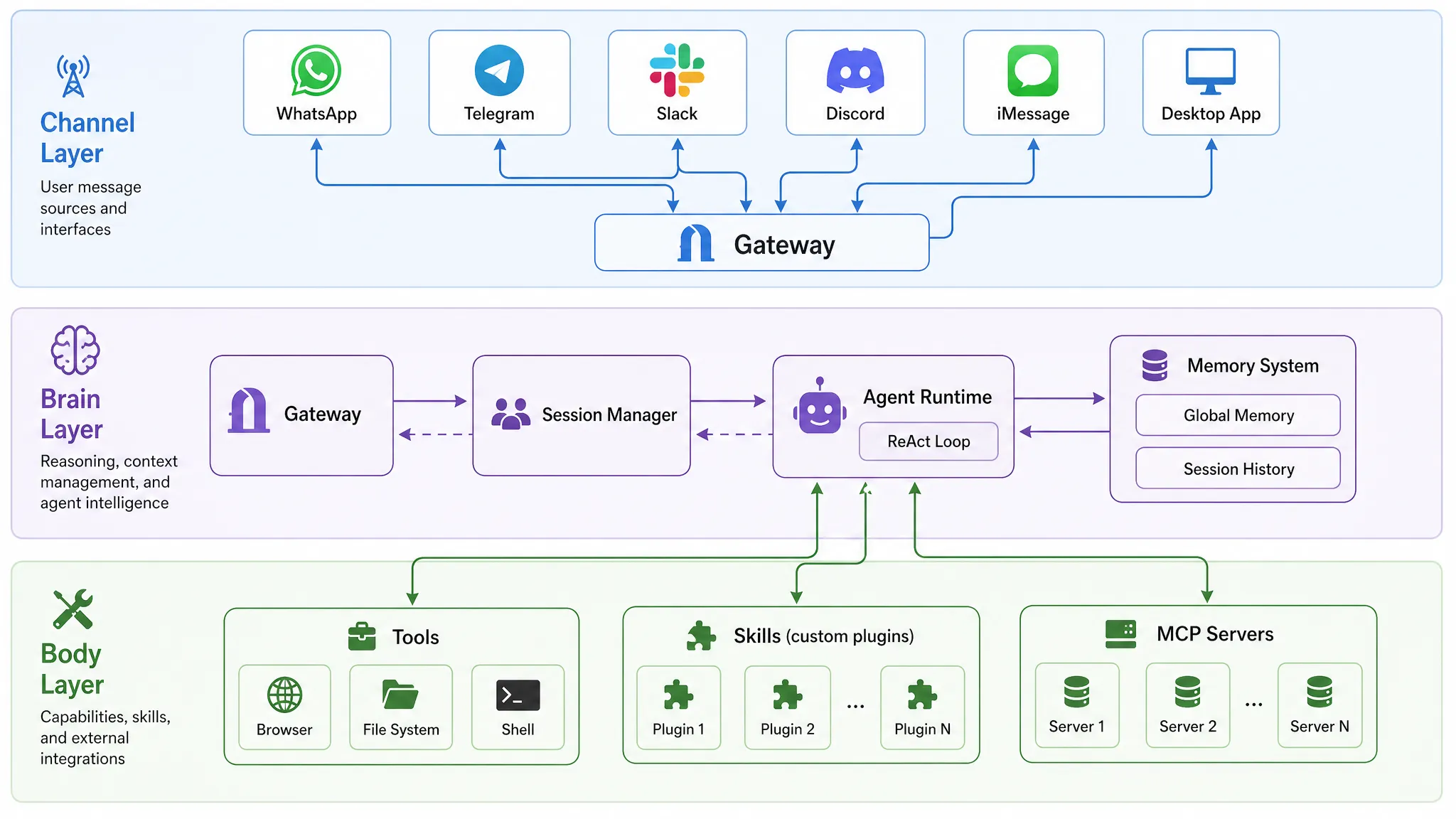
Channel Layer — the system’s “senses.” It interfaces with messaging platforms (WhatsApp, Telegram, Slack, Discord, iMessage, Desktop App, etc.) and normalizes their diverse protocols into a unified internal format. Think of it as a translator: regardless of what platform a user sends from, it all becomes the same language internally.
Brain Layer — the system’s “thinking center.” This is where the Agent Runtime lives, executing the ReAct (Reason + Act) loop: receive input → reason → decide → invoke tools → observe results → reason again. All intelligent behavior happens here.
Body Layer — the system’s “limbs.” Browser automation, file system access, shell commands, MCP Servers, custom Skills — all the actual execution capabilities. After the Brain Layer makes a decision, the Body Layer carries it out.
The flow between layers is straightforward: Channel receives message → Brain figures out what to do → Body does it → Brain compiles the result → Channel sends response.
Core Concepts
Gateway: The Nervous System
The Gateway is the entire system’s “nerve center” — a WebSocket server responsible for message routing and session management. It bridges Channels and Agents, with all messages passing through it.
Think of the Gateway as a telephone switchboard: incoming calls (user messages) arrive, it routes them to the right extension (Agent) based on rules, and forwards the reply back. A single Gateway can manage multiple Agents, each serving different user groups or scenarios.
Agent: The Thinking and Acting Entity
The Agent is OpenClaw’s core component that executes the AI operation loop. Its responsibilities include:
- Context assembly: combining session history, memory, skill instructions, etc. into a prompt for the model
- Model invocation: sending context to an LLM and receiving reasoning results
- Tool execution: calling the appropriate tools based on model decisions
- State persistence: saving conversation history and learned memories
A single Gateway can run multiple Agents, each with its own identity file (SOUL.md), toolset (Skills), and workspace. For example, you could run a “work assistant” Agent and a “personal concierge” Agent on the same Gateway, each operating independently.
Session: The Conversation Context Container
A Session maintains conversation context and history. Whenever a user interacts with an Agent through a Channel, the system creates an isolated Session for that combination.
The Session Key format is workspace:channel:userId, ensuring complete isolation between different platforms and users. Your Telegram conversation with an Agent won’t bleed into your Slack conversation.
Internally, a Session maintains the full conversation history and uses smart mechanisms (trimming tool results, compressing long conversations via summarization) to control context length and avoid token explosion.
Channel: The Connection to the World
A Channel is a messaging platform adapter. Each Channel corresponds to a specific platform and handles:
- Receiving raw messages from that platform
- Converting them into OpenClaw’s internal standard format
- Transforming Agent responses back into platform-specific format for delivery
The system uses Bindings to determine “which Agent should handle messages from which Channel and which user.” These are deterministic routing rules that can match on channel type, account, user ID, guild, roles, and more.
How They Work Together
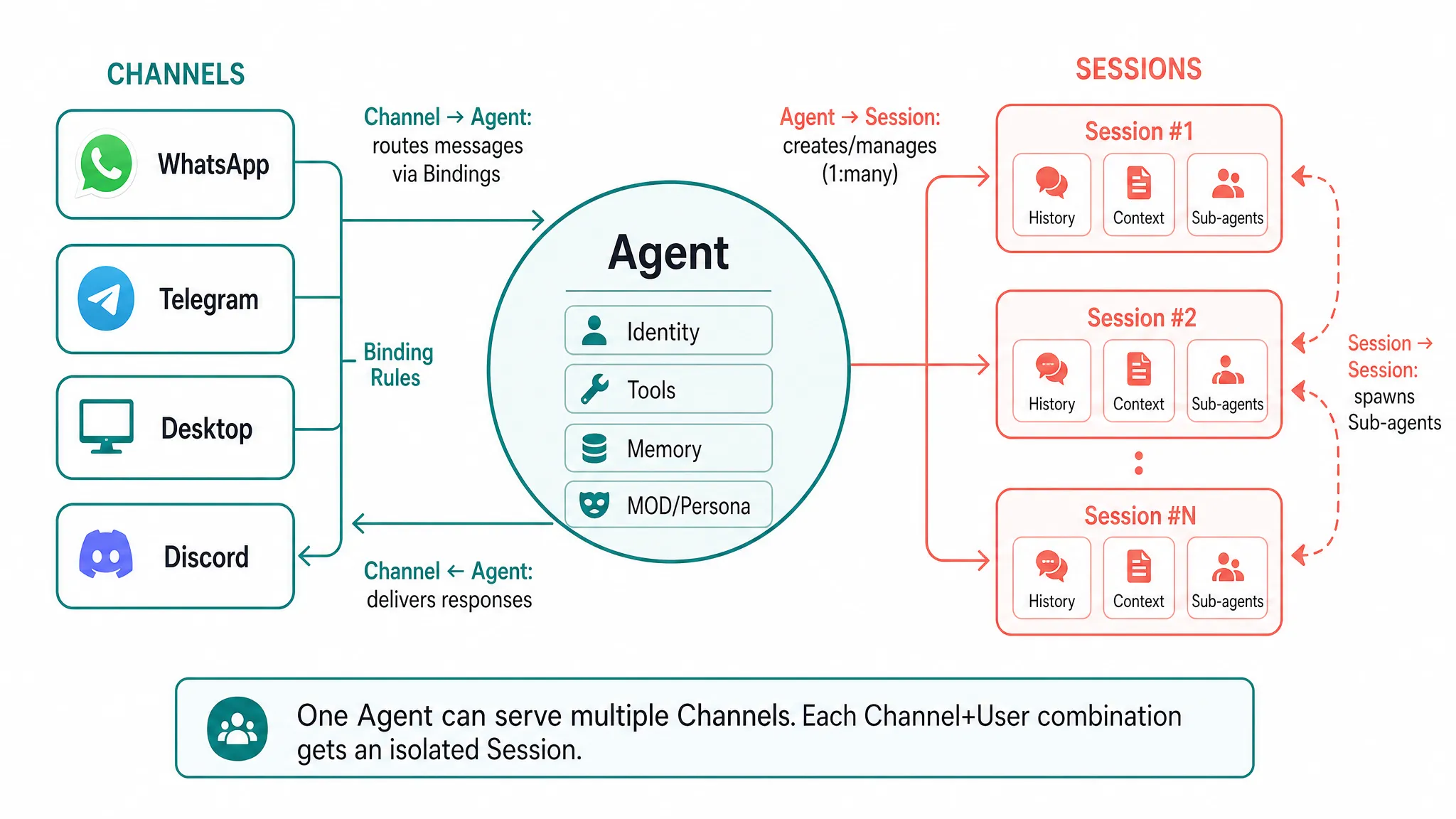
Putting it all together:
- A user sends a message on some platform (say, Telegram)
- The corresponding Channel receives it, normalizes it, and forwards it to the Gateway
- The The Gateway uses Bindings to find the right Agent for this message
- The Agent looks up or creates the appropriate Session (based on channel + userId)
- The Agent executes the ReAct loop within that Session’s context
- The result flows back through Gateway → Channel to the user
One Agent can serve multiple users across multiple Channels simultaneously, with each user having their own isolated Session.
Session Deep Dive
Session is one of the most important concepts to understand deeply, because many “weird behaviors” in practice trace back to it.
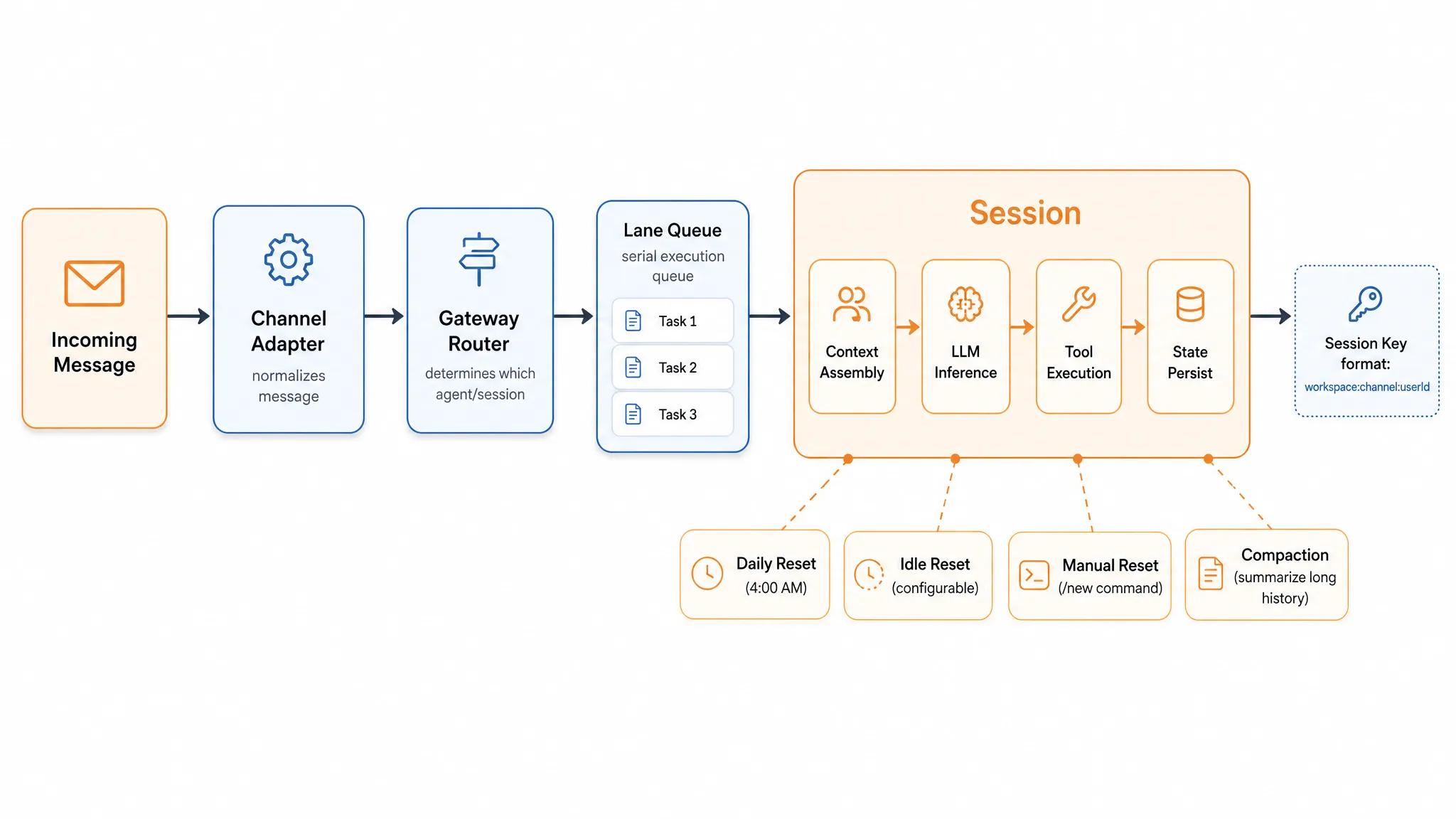
Lifecycle
Sessions aren’t permanent — they have an explicit lifecycle:
- Daily reset: resets at 4:00 AM by default, starting a fresh day
- Idle reset: automatically resets after prolonged inactivity
- Manual reset: user sends
/newto explicitly start a new conversation
A reset clears conversation history and the Agent starts fresh — but this doesn’t mean it has amnesia, because important information has already been persisted to Memory (more on this below).
Isolation Levels
Session isolation is configured via dmScope at different granularities:
- main (default): all DMs across all channels share a single Session
- per-peer: one isolated Session per user, shared across Channels
- per-channel-peer (recommended): one isolated Session per Channel + user combination, so the same user has separate conversations on different platforms
Steering Queue: Message Steering
This is an easily overlooked but critical design. When a message arrives while an Agent is already processing, OpenClaw doesn’t wait for it to finish — it uses a Steering Queue to decide how to handle the incoming message.
OpenClaw provides six queue modes:
- steer (default): injects the new message into the currently running Agent, so the model sees it at the next reasoning boundary
- queue: legacy one-at-a-time injection
- steer-backlog: injects into the current run while also saving a copy for a later followup turn
- followup: doesn’t disturb the current run; queues messages for later processing
- collect: waits for the current run to finish, then coalesces multiple waiting messages into one followup turn
- interrupt: aborts the active run and immediately processes the newest message
The other side of this mechanism is serial guarantee: messages within the same Session are never processed in parallel, preventing race conditions when the Agent reads and writes files. Slightly slower, but for good reason — it buys you determinism and debuggability.
Sub-agents: Background Workers
Some tasks are time-consuming (deep research, large-scale file processing). If executed in the main Session, the user has to wait. Sub-agents solve this — they spawn from the current Session, run in their own isolated Session, and report results back when finished.
Think of them as worker threads dispatched from the main thread: the main thread keeps responding to the user while workers handle heavy lifting in the background.
Extension Mechanisms
Skills: Pluggable Capabilities
Skills are OpenClaw’s capability extension modules. Each Skill is essentially a structured knowledge file (typically Markdown) that tells the Agent “how to handle certain types of tasks.”
What makes Skills powerful:
- Hot-loadable — no Gateway restart required
- Community can share and reuse them through registries like ClawHub
Memory: Persistent Cross-Session Knowledge
Memory solves the “Agent loses everything when Session resets” problem. Its core file is MEMORY.md, stored in the Agent workspace, holding durable facts and preferences across sessions (e.g., “user prefers concise responses”).
An elegant aspect of Memory is that it’s human-auditable — you can open MEMORY.md directly to see what the Agent remembers, and even edit it manually. Retrieval uses hybrid vector + keyword search to efficiently find relevant memories.
Note the distinction: Memory is persistent knowledge (MEMORY.md); Session History is the current conversation transcript — they are different things. A Session reset clears the transcript, but MEMORY.md content is preserved.
SOUL.md: Personality Definition
SOUL.md is the core file defining an Agent’s persona and behavioral philosophy. OpenClaw distinguishes “what to do” (AGENTS.md) from “who to be” (SOUL.md) — SOUL.md is injected into the system prompt at the start of every session, ensuring the Agent maintains a consistent communication style, values, and behavioral boundaries. It’s written in plain Markdown, can be directly edited, and the community has even spawned open-source projects like ClawSouls for sharing and installing pre-configured personas.
Bindings: Multi-Agent Routing
Bindings are deterministic mappings that route messages to different Agents. A binding is essentially a set of match conditions (channel, accountId, peer, guild/team) → agentId, telling the Gateway “which Agent should handle this message.”
Routing follows a most-specific wins principle: peer-level matches take precedence over channel-level matches, and specific rules override wildcards. For example, you can route a specific WhatsApp contact’s messages to a dedicated Agent while all other WhatsApp messages go to a default Agent.
Bindings are what make OpenClaw’s multi-agent architecture possible — you can run multiple Agents like “work assistant” and “personal concierge” side by side, each with its own isolated workspace, SOUL.md, and session store.
Summary
Let’s recap OpenClaw’s core architecture:
- The three-layer model separates concerns: Channel handles communication, Brain handles thinking, Body handles execution
- Gateway is the nerve center connecting everything
- Agent is the execution unit running the ReAct loop
- Session is the context container providing isolation and serial guarantees
- Channel is the adapter connecting various messaging platforms
- Skills, Memory, SOUL.md, and Bindings solve capability extension, persistent memory, personality definition, and message routing respectively
Understanding these concepts and their relationships makes using and debugging OpenClaw significantly smoother. If you haven’t installed it yet, check out my earlier installation guide; if you’re already using it, try observing the system’s behavior through the lens of this article — you’ll have plenty of “aha” moments.